
CALIFORNIA DEMOCRATIC COUNCIL · EXPLAINER
Understanding data centers
What they do, how they stay cool, and what the evidence can—and cannot—tell us.
At a glance
A data center brings together computing equipment, cooling, electricity and network connections. Servers process information; cooling carries heat away; power systems support operation through interruptions; and network links connect the facility to users and other systems.
Start with the overview, use the topic links below for detail, or go straight to the questions to ask about a proposed facility. Technical terms and examples are explained throughout.
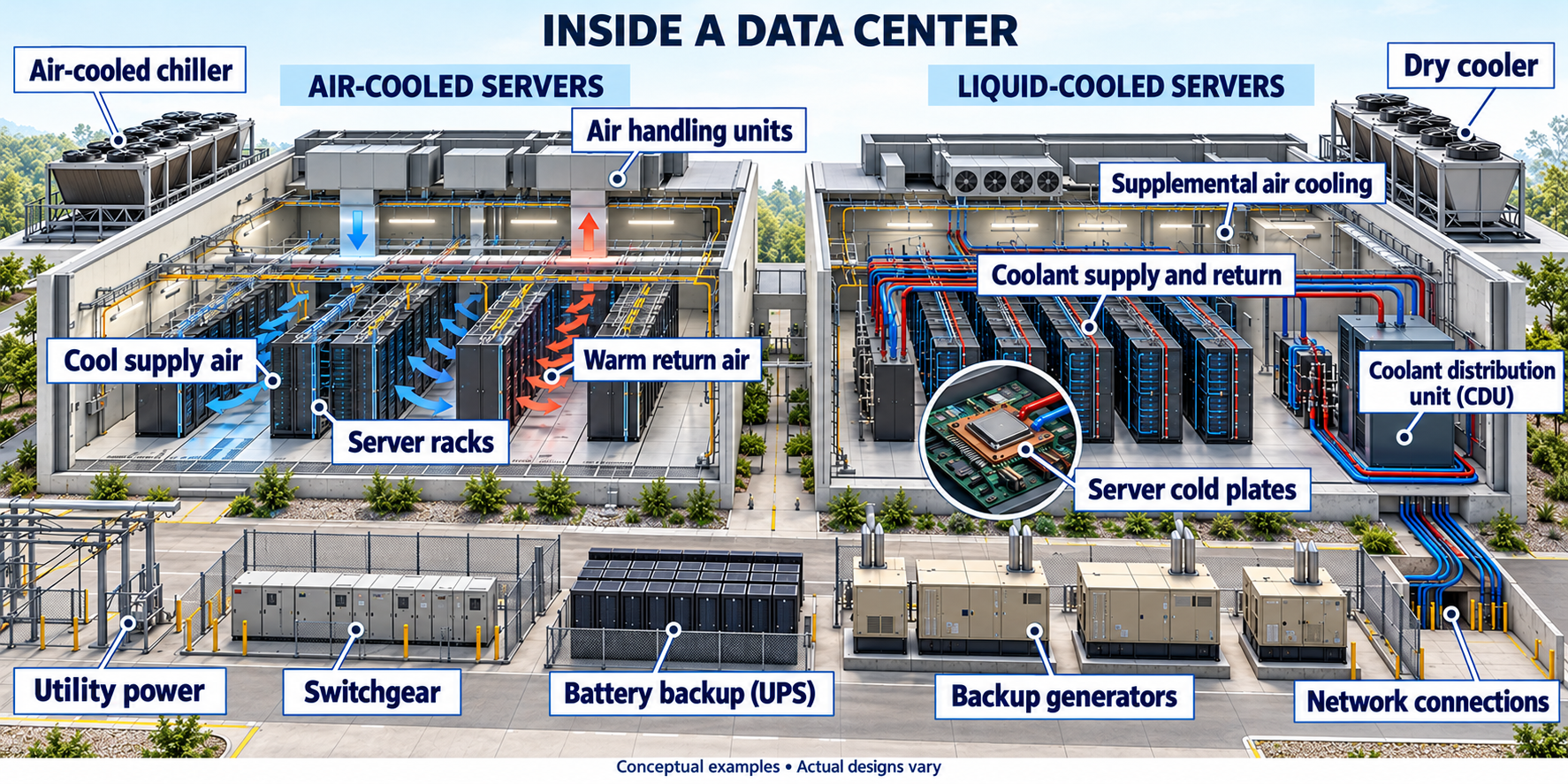
Conceptual, AI-generated illustration. Selected air and direct-to-chip cooling arrangements; immersion tanks are not shown. Engineering details are unverified. Select the image to read the labels at full size.
About the illustration
The illustration explains selected arrangements, rather than a verified installation or a complete catalog of cooling designs. Equipment placement, pipe routing, sizing and performance are unverified. Actual facilities may combine cooling methods; the two sides do not define universal categories.
What a data center does
A data center houses computers, storage systems and networking equipment that process, store and move digital information. It supports services such as websites, business applications and cloud computing. AI is one possible workload; “data center” does not mean “AI facility.” Source: IBM, What Is a Data Center? (company explainer).
Servers do the computing. Storage holds information. Network equipment connects systems to each other and to users. Cooling and electrical infrastructure help that equipment operate reliably. Designs differ in size, equipment and redundancy. Source: IBM.
How the cooling works
Air at the server. Fans move cooled air through IT equipment and carry heat away. Room or rack cooling equipment then removes that heat. The cooling units may use refrigeration, chilled water or glycol-based coolant. Air cooling at the server therefore does not establish that the facility uses no water. Source: Vertiv, precision air conditioning (manufacturer explanation).
Liquid at the chip. In direct-to-chip cooling, coolant flows through cold plates attached to selected components, transferring their heat into a liquid circuit. A coolant distribution unit (CDU) manages the interface between the IT cooling circuit and the next cooling stage. Liquid-to-liquid and liquid-to-air CDU designs both exist. Source: Vertiv CoolChip CDU brochure, p. 2 (manufacturer documentation).
Some air cooling may still be needed. Cold plates do not necessarily cool every component. A peer-reviewed study describes cold-plate systems in which air cooling remains necessary. Liquid cooling also includes immersion methods; the supplied illustration shows cold plates, not immersion tanks. Source: Alissa et al., Nature (2025), cooling technology discussion.
Immersion cooling: servers in a dielectric bath
Immersion cooling submerges servers in a dielectric liquid—an electrically insulating fluid that absorbs heat from the components. Heat passes to a heat exchanger and then to another cooling circuit for rejection or possible reuse. Unlike direct-to-chip cold plates, immersion places the server equipment in a coolant bath. Source: 2CRSi, Immersion Cooling for Data Centers (manufacturer explanation).
Single-phase: the coolant remains liquid as it absorbs heat and transfers it to the cooling system.
Two-phase: component heat boils a low-boiling-point coolant. Vapor condenses on a cooled coil and returns to the bath as liquid. The two phases are liquid and vapor. Source: 2CRSi, single-phase and two-phase descriptions.
Source limit: 2CRSi’s advertised savings are manufacturer claims, not universal results. No installation-specific savings, safety assessment or water demand is established here.
Where the heat goes
An air-cooled chiller and an air-cooled server are different things. A chiller uses a refrigeration cycle to remove heat from a fluid. “Air-cooled” describes how its condenser rejects heat to air; it does not mean there is no chilled-water circuit elsewhere in the system. Source: Trane, What Is a Chiller? (manufacturer explanation).
A dry cooler transfers heat from a closed liquid loop to outdoor air without evaporative cooling in dry operation. Its capability depends on outdoor conditions and loop temperatures. Cooling towers and adiabatic systems can use evaporation instead. Seeing a dry cooler in a diagram does not prove that a complete facility has no other water uses or cooling modes. Source: Munters, Dry Coolers for Data Centers (manufacturer documentation).
A closed loop is only part of the story. Vertiv documents direct-to-chip arrangements with cooling towers, dry coolers or an existing chilled-water loop as heat-rejection options. A closed IT coolant circuit alone therefore cannot tell us whether another part of the facility evaporates water. Source: Vertiv brochure, p. 2.
Power, batteries and backup generators
IT equipment and its supporting systems require electricity. A battery-backed uninterruptible power supply (UPS) can protect equipment during brief interruptions; generators can provide backup during longer outages. The presence of a generator does not reveal its operating hours, fuel, emissions or permitted limits. Those require records for the particular installation. Source for equipment roles: IBM. Installation-specific information is not established here.
How long do the backup batteries last?
Usually a bridge measured in minutes. In a facility with generators, the UPS keeps critical equipment powered while generators start and the electrical load transfers. Schneider Electric’s July 2020 design guide gives examples of 1–2 minutes for hyperscale facilities, about 5 minutes for cloud and colocation facilities, and 10–15 minutes in financial-sector installations. These are the manufacturer’s dated examples, not a current industry-wide survey, mandatory standard or verification of any particular site. Source: Schneider Electric, UPS design considerations.
One hour and one day are different design goals. Eaton explains that runtime depends on the connected load and battery configuration; larger batteries or supported external battery packs can extend it. The UPS must meet both the required power capacity and the desired duration. Growth and redundancy also affect sizing. A UPS power rating alone does not establish how long its batteries will last. Source: Eaton, UPS sizing guide.
Illustrative energy calculation—not a battery specification. For a constant protected load of 1 megawatt (MW), energy delivered to the load equals power multiplied by time:
• 5 minutes: approximately 83 kilowatt-hours (kWh).
• 1 hour: 1 megawatt-hour (MWh), or 1,000 kWh.
• 24 hours: 24 MWh, or 24,000 kWh.
These are calculated output-energy requirements. They exclude conversion losses and battery operating limits; they are not the installed battery capacities or a runtime guarantee. Actual selection requires the manufacturer’s runtime data and the project’s design conditions.
Cooling must also remain available. Schneider notes that some cooling systems have generator backup without UPS support. Powered servers alone therefore do not establish that the facility can continue operating through an outage. Source: Schneider Electric.
AI rack power: NVIDIA examples and the roadmap
The examples below concern dense AI compute racks, not an average across all data centers. There is no single “standard NVIDIA rack” power figure. Keep rack power requirements, cooling capacity and measured electrical draw separate.
Published rack examples
GB200 NVL72 — 120 kW per rack. NVIDIA’s May 16, 2025 MGX article publishes this rack power figure. It is not a metered average across workloads. Source: NVIDIA, Building the Modular Foundation for AI Factories with NVIDIA MGX.
GB300 NVL72 — up to 142 kW for the documented full rack. NVIDIA’s reference configuration includes 72 Blackwell Ultra GPUs, 36 Grace CPUs, rack switches and power equipment. This figure applies to that configuration. Source: NVIDIA NVL72 AI Factory, System Hardware & Components.
Vera Rubin NVL72 — cooling sized for 227 kW per rack. This is Supermicro’s published DCBBS cooling design figure, not measured electrical consumption. A comparable metered electrical draw has not been established here. Source: Supermicro, DCBBS Blueprints for NVIDIA Vera Rubin NVL72.
Power is a rate; energy accumulates over time
Illustrative arithmetic, assuming constant load:
• A rack drawing 120 kW for 24 hours uses 2,880 kWh (2.88 MWh). Over 365 days at that constant draw: 1,051,200 kWh (1.0512 GWh).
• A rack drawing 142 kW for 24 hours uses 3,408 kWh (3.408 MWh). Over 365 days: 1,243,920 kWh (1.24392 GWh).
These are calculations using the published power figures above, not measured consumption or a utilization forecast. They exclude separately powered facility cooling, UPS losses and other equipment outside the rack boundary.
Workload changes electrical draw. NVIDIA describes power swings and controls that steer power between CPUs, GPUs and switches. A design requirement cannot substitute for a metered average, and a GPU-only rating does not describe complete rack or facility demand. Source for workload behavior and power controls: NVIDIA, Vera Rubin POD technical explanation, March 16, 2026.
What NVIDIA’s power roadmap actually says
Megawatt-scale infrastructure is a roadmap direction. In May 2025, NVIDIA described developing 800-volt DC infrastructure to support 1 MW IT racks and beyond starting in 2027. One megawatt equals 1,000 kW. This is a dated infrastructure target, not a consumption specification for a named future rack or a guaranteed delivery schedule. Source: NVIDIA, 800 VDC architecture technical article.
A later update describes a staged rollout. NVIDIA’s August 11, 2026 article describes an MGX-compatible 800 VDC power rack arriving in the second half of 2026 for existing AC facilities, and a row power center supporting up to 2 MW per row with availability expected in 2027. Per row is not per compute rack. These are manufacturer announcements; this page has not independently confirmed deployment or delivery at a specific site. Source: NVIDIA, Why Scaling AI Compute Performance Requires a New Power Architecture.
Density and efficiency answer different questions. A more powerful rack may contain more equipment or produce more output. Compare equivalent workloads and measured output per unit of energy. These rack figures alone do not establish future industry electricity demand.
Network connections: fiber, redundancy and rings
Fiber connects facilities and networks. A cross-connect is a dedicated physical cabling link between parties within a facility. Equinix specifies single-mode fiber for new cross-connect orders; this is an operator-specific example. Source: Equinix, Cross Connect (operator documentation).
Redundancy provides alternatives when something fails. Microsoft’s ExpressRoute guidance addresses the end-to-end connection, including customer equipment, providers and cloud connections, and recommends multiple peering locations for stronger resilience. The design depends on application requirements. Source: Microsoft, ExpressRoute resiliency guidance.
Separate circuits are not proof of separate routes. Physical diversity concerns where cables actually travel. Equinix says its Fabric network uses multiple carriers and redundant circuits and compares providers’ routes during procurement. It also warns that cross-connects inside its buildings are not guaranteed to follow diverse paths. The practical implication is that a second connection—or a second provider name—does not by itself establish physical independence. Sources: Equinix Fabric and Cross Connect.
A fiber ring is one way to provide an alternate path. A ring links network nodes in a loop. With an appropriate protection protocol, a link failure can trigger switching to the remaining route around the ring. Cisco documents this behavior for ITU-T G.8032 Ethernet Ring Protection Switching. The protocol manages forwarding to avoid Ethernet loops during normal operation and restores a usable path after a supported failure. A ring therefore needs working equipment and configured protection; the loop shape alone is not a guarantee of uninterrupted service. Source: Cisco, G.8032 configuration guide (vendor technical documentation).
Path protection and equipment protection differ. Equinix’s Protected Metro Connect uses two fiber paths but one switch at each end; it explicitly lacks node protection. Dual-Diverse uses two paths and two switches at each location. Evaluate which failures a connection can withstand. Source: Equinix, Metro Connect (operator documentation).
Test the failover. Microsoft recommends evaluating redundant circuits and testing failover. Ask for route documentation, equipment dependencies, capacity remaining after failure and test results; the closing questions provide a checklist. Source for validation guidance: Microsoft.
What efficiency numbers can—and cannot—tell us
Power usage effectiveness (PUE) compares total facility energy with IT-equipment energy over the same reporting boundary and period. For example, PUE 1.2 means 1.2 units of facility energy per unit of IT energy. It describes infrastructure overhead; it does not report total electricity consumption, water consumption, carbon emissions or useful computing output. Check the measurement boundary and reporting period before comparing sites. Source for PUE and reporting boundaries: Google Data Centers (operator documentation). The numerical example is illustrative.
A cooling design can improve one measure without answering every environmental question. A peer-reviewed life-cycle assessment compares air, cold-plate and immersion cooling, including equipment production, operation and end of life. It finds benefits for liquid cooling in the scenarios studied. Those are model-based comparisons with stated assumptions, not guaranteed savings for every facility or AI workload. Source: Alissa et al., Nature 641, 331–338 (2025).
Company statements need their scope. In December 2024, Microsoft described new designs intended to eliminate evaporative water use for cooling after initial filling. Its article also says water remains necessary for uses such as restrooms and kitchens. This is an attributed company description of specified designs—not evidence that every Microsoft facility, or every data center, uses no water. Source: Microsoft Cloud Blog, December 9, 2024 (company announcement).
Sources and evidence limits
Peer-reviewed research: Alissa, H. et al. (2025), Using life cycle assessment to drive innovation for sustainable cool clouds, Nature 641, 331–338. DOI: 10.1038/s41586-025-08832-3. The authors disclose current or former employment at Microsoft or WSP. Peer review does not remove the need to examine assumptions or possible conflicts of interest.
Source types: Company documentation from IBM, Vertiv, Trane, Munters, 2CRSi, Schneider Electric, Eaton, NVIDIA, Supermicro, Equinix, Cisco, Google and Microsoft is linked beside the relevant claims. Manufacturer specifications and operator descriptions are attributed to their source; they are not independent audits of a facility.
Scope and evidence standard: This is a technical background guide, not an assessment of a particular project. No site’s electricity or water use, backup endurance, noise, emissions, fiber diversity or local infrastructure effects have been verified here. Measured results, design specifications, illustrative calculations, model estimates and roadmap announcements are identified separately. A claim without supporting records is unconfirmed; unavailable information is unknown. Neither means zero impact. Sources checked October 19, 2026.
Questions to ask about a proposed facility
Use these questions to turn the background above into a discussion of a specific project. For every answer, ask for the dated source, units, measurement boundary and whether it describes a proposal, a modeled estimate or measured operation.
1. What is the actual power demand? What are the proposed connection capacity, expected average demand, peak demand and annual electricity use? Which figures cover IT equipment, and which cover the whole facility? How do they change as the project fills with equipment?
2. How will heat be removed? Which equipment uses air, cold plates or immersion? Where does the heat ultimately go? Which cooling modes operate during normal weather, extreme heat and a power interruption?
3. What water will the facility use? What are the annual and peak-day quantities, and what water sources supply them? Do the figures describe water withdrawn, water consumed, or both? Do they cover onsite operations only, or also water associated with electricity generation? What assumptions and records support the answer?
4. What can the backup systems actually support? What loads are on the UPS, including cooling and network equipment? How long can the batteries support those loads under the specified conditions? What generator transfer tests, fuel-endurance estimates and refueling plans support the outage strategy?
5. How independent are the network connections? Do the fiber routes share conduits, building entrances, upstream equipment or power supplies? Which failures can the design withstand, how much capacity remains, and has failover been tested?
6. How are local effects assessed? What documents address grid and water infrastructure, generator emissions, noise and operating restrictions? Which results are predictions, which are permit conditions, and which have been measured? Who verifies compliance and reports changes?
7. Can the claims be checked? Request the relevant design documents, permits, measurement methods and operating records. Are company-wide averages being presented as local results? Are future roadmap targets being presented as installed equipment? What remains unknown or unconfirmed, and when will it be resolved?