 California Democratic Council
TECHNOLOGY THAT SUPPORTS LOCAL ORGANIZING
Sponsored Website Program
Your club’s website should help people find you, learn about your work, and get involved. CalDC provides free WordPress hosting for approved affiliated Democratic clubs and county central committees, with technical support from our Technology Committee.
Your organization’s voice, with technical help behind it
Use your site to post meetings, introduce your organization, publish news and endorsements, and welcome volunteers. Your local team manages its content. CalDC manages the shared hosting platform, network software, security systems, and backups.
The program brings these tasks together so volunteers can spend more time organizing and less time maintaining a server. Explore websites in the CalDC directory.
How the network works
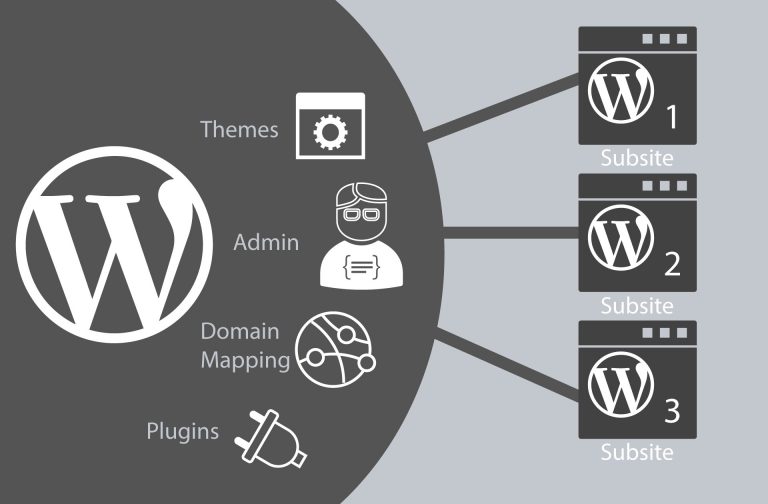
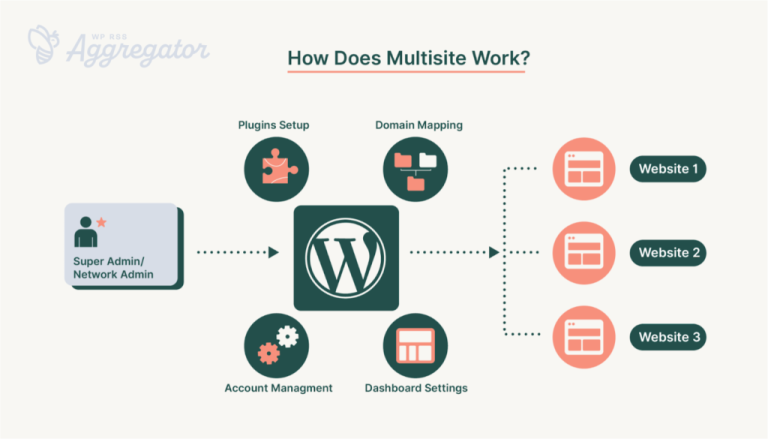
Our websites run on a WordPress multisite network hosted on Amazon Web Services (AWS). Each organization has its own site and editing accounts, while the Technology Committee manages the shared installation. The diagrams below illustrate that arrangement.
What your team handles—and where we help
Your club or committee
- Chooses its message, activities, and endorsements.
- Keeps local news, meeting dates, and contact information current.
- Identifies authorized editors and tells us when officers or webmasters change.
CalDC’s Technology Committee
- Helps establish the site and editing access.
- Maintains the shared WordPress software and hosting.
- Manages network security and backups.
- Assists with technical problems and requests for additional features.
How to join
- Submit the CalDC affiliation form. Indicate that your club or county committee needs a website.
- Complete affiliation approval. Participation requires approval of your organization’s affiliation by the CalDC Membership Director.
- Work with the Technology Committee. We will follow up with you or your organization’s president to discuss the site and access.
Questions about the program
What does it cost?
CalDC charges no hosting fee to participating affiliated clubs and county central committees. Contributions to CalDC help sustain the program. Ask the Technology Committee about arrangements for your organization’s domain name.
Can we edit our own website?
Yes. Authorized club officers and webmasters can manage their organization’s content. Email tech@caldc.org to arrange access or update accounts when your leadership changes.
Can we add themes, plugins, or features?
The network shares software across sites, so installation and removal are managed centrally. Ask the Technology Committee about a feature you need or a plugin you would like to use. The team can check how it fits the network and help with available options.
Who handles security and backups?
CalDC maintains network security systems and backups. Contact the Technology Committee if you need help recovering content or investigating a security concern.
Why do I see plugins that our site does not use?
The network makes shared tools available to multiple organizations. A plugin your site does not use may support another site. Ask us which tools fit your needs.
What if our site shows a browser security warning?
Email tech@caldc.org with the website address and the warning you see so the team can investigate.
Let’s get your organization online
Whether you are starting a club or helping an established committee reach more neighbors, CalDC can help you build a web presence your volunteers can maintain.
Affiliate and request a website · Contact technology support